Showing posts with label roms. Show all posts

Wednesday, August 15, 2018

HOT KNOT: ANOTHER COOL WAY OF SENDING FILES

This is one feature that up to 80% of android users do not know its use. The Hot Knot is a new feature that was recently installed on android devices.Image result for hot knot


How does it work?

 You can transfer files from one android device to another without using Bluetooth or wifi.


But for this to work, both devices need to have Hot Knot and they need to be at about a centimeter close to each other.

Also Read : How to Add Brightness Slider on Status Bar in Android

What can you send?

Well, you can send just about anything.
From photos, videos, contacts, share application data and lots more.
To activate this cool android tip, 

Go to settings, Select Hot Knot, 
Then switch it on, android tips and tricks marshmallow


Note: Devices must be close to each other and both have hot knot enabled to share files.


Sunday, August 12, 2018

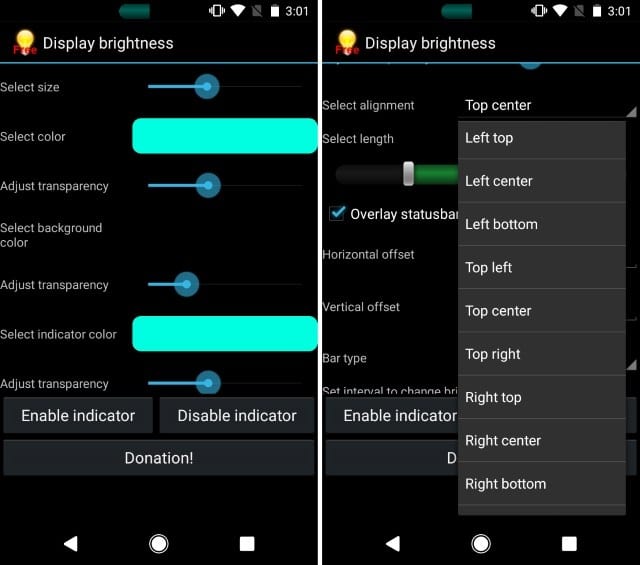
How to Add Brightness Slider on Status Bar in Android

Now you can Add Brightness Slider on Status Bar in Android using the simple app that will help you to easily adjust brightness by simply sliding on your status bar. So have a look at complete guide discussed below to proceed.


Image result for How to Add Brightness Slider on Status Bar in Android

How to Add Brightness Slider on Status Bar in Android


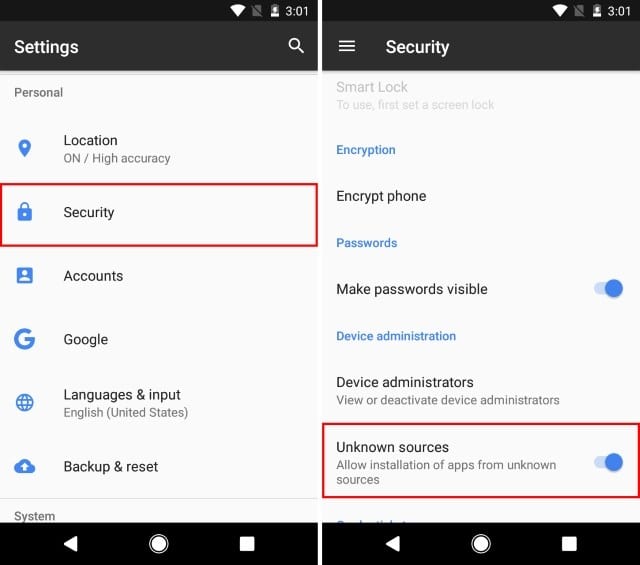
Step 1. First of all, enable the ‘Unknown Sources’ on your Android smartphone. For that, head to the Settings > Security > Unknown Sources and then enable it.


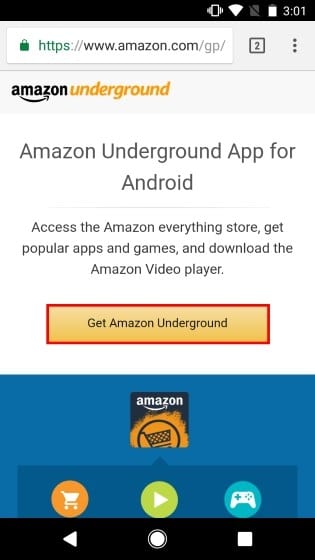
Step 2. Now in the next step, you need to download and install the Amazon Underground app on your Android. You can get the app link from here.


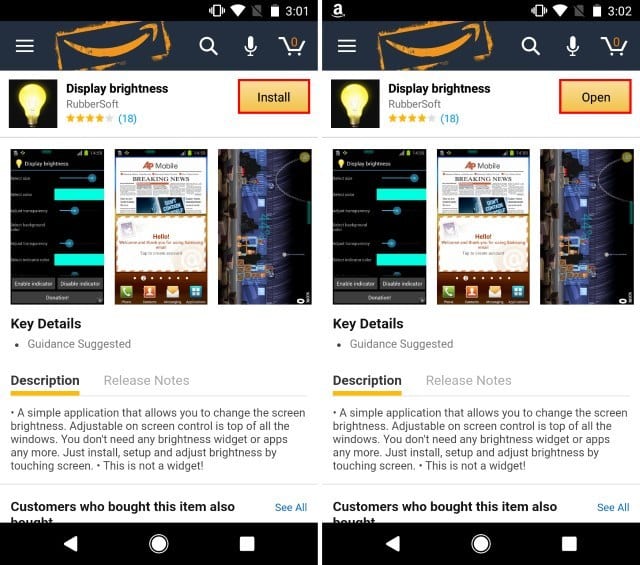
Step 3. Now from there, you need to search for the ‘Display Brightness‘. The app is only available on Amazon Underground. After finding the app, install it on your Android smartphone.


Step 4. After installing ‘Display Brightness’ on your Android device, open the app. Now you can customize several options like adjust the size, transparency, length, height, etc. You can even change the color of the slider.


Step 5. Now you will see a brightness slider on your Stauts Bar. Now you just need to drag the slider to adjust the brighness of your Android. You can place the brightness slider anywhere on the screen.

Also Read : How To Use Both Data & Wifi at the same time


That’s it, you are done! This is how you can use ‘Display Brightnes’ to add a brightness slider on your Android’s Status Bar. If you need further help regarding the installation steps, then discuss with us in the comment box.

Saturday, April 8, 2017

XOSP : Best custom Stable ROM (Android 6) for Redmi 2 & Prime With Step by Step Guide


XOSP , The Xperia Open Source Project . This is one of the best Custom rom for Redmi 2 and Redmi 2 Prime . I am using this ROM from 7 days and I have not faced any issue with it . Thanks a lot Developer for this awesome custom ROM , The vision was to create a minimal bloat free ROM which included Sony Xperia specific apps and various tweaks users would expect from a custom ROM.


Revisions and Releases :-


Revisions include small changes such as bug fixes/improvments etc.. (there are 5 revisions until a new Release is made)
Releases are the final "stable" builds with all new planned features implemented and bugs fixed.
  • Based on CM 13.0
  • Removed many unnecessary apps and stuff as well as CM ones
  • StatusBar Clock font style
  • StatusBar Clock font size
  • Added StatusBar Date & style options
  • Added option for date style/position, left-right of clock
  • Xperia Z5 inspired LockScreen style
  • Xperia Fonts
  • Xperia Battery Text prototype
  • Time Contextual Headers
  • XOSP Universal dialog for Shutdown/Reboot and Dexopting Process
  • XOSPOTA
  • Stock Kernel
  • Snap Camera
  • ViPER Audio Engine
  • Theme Chooser
  • Xperia based Bootanimation
  • Custom Framework and SystemUI Xperia drawables
  • XOSPFileManager
  • Xperia Z5 sounds
  • Xperia X Wallpapers
  • XOSPSetupWizard
  • Custom Materialized
  • Stock Browser is custom themed
  • Contacts is custom themed (Much more Xperia Style)
  • Dialer is custom themed (Much more Xperia Style)
  • Status bar logo
  • Navigation Bar ON/OFF
  • NavBar dimensions
  • SlimDim
  • HW Keys ON/OFF
  • SlimSeek Bar
  • Status bar Network Traffic indicator
  • RAM Bar in recents options
  • Toast Animations
  • Long Press back to kill in Development Settings
  • Ability to hide the Super SU status bar icon
  • Dashboard Columns
  • Dashboard double lines toggle
  • Double Tap to sleep anywhere on the lockscreen
  • On-the-go Mode
  • Double tap to sleep on navigation bar
  • SystemApp remover
  • Omni inbuilt SystemUI Screen recording
  • SuperSU
  • Xperia Apps
  • Xperia Z5 Home app
  • Album App
  • PhotoEditor
  • PhotoAnalyzer
  • Xperia Keyboard (aka textinput-tng)
  • Music (former WALKMAN)
  • Video
  • SemCalendar
  • AudioRecorder (Material Version)
  • ClockWidgets
  • Sketch
  • SmartConnect
  • WallpaperPicker (For Xperia X custom wallpapers)
  • Weather App
  • Wheater Widget
  • Walkman Widget
  • Track ID
  • SomcPodcast
  • SemcDLNA


Downloads :- 


XOSP ROM From Here : http://downloads.xosp.org

XOSP APPS From Here : http://downloads.xosp.org

Gapps From Here : http://opengapps.org/ ( I suggest the Nano Package )


Note : You must Need to Root and install cusom Recovery such as TWRP or CWM to flash this ROm . Else you will get Bootloop !


Installations Method :

  • 1. Download latest build,XOSPApps and GApps from the Above links .
  • 2. Reboot recovery
  • 3. Wipe data factory reset
  • 4. Flash latest XOSP Rom package.zip
  • 5. Flash Gapps nano.zip
  • 6. Flash XOSP apps.zip
  • 7. Reboot

That's it . Now if you don't like stock XOSP looks then you should make your looks like mine ( Check screenshots ) It looks pretty cool .  

Downloads :


I Have Made a video on How you can make your XOSP more beautiful step by step . Please do subscribe if you like !